Ansible Galaxy & Git Mirror Daemon
ORBITRON
Self-hosted mirror for Ansible roles & collections — from Ansible Galaxy or straight from GitHub. A single static Go binary that speaks native Galaxy V1 + V3 APIs — soansible-galaxy just works against it, with zero client changes, even when there is no internet.
[galaxy]
server_list = orbitron

[galaxy_server.orbitron]
url = https://orbitron.internal/api/- 1static binary
- 0runtime deps
- V1+V3Galaxy APIs
Built for isolated, pinned, repeatable automation
Orbitron caches whatever your pipelines need — roles, collections, git-backed sources — pulled from Ansible Galaxy or cached straight from GitHub & GitLab, and serves them as an authentic Galaxy endpoint. Everything ships in one dependency-free binary.
Native Galaxy V1 + V3 API
ansible-galaxy role install and collection install.
Point ansible.cfg at it — no client changes, no retraining. Roles are cached as
unpacked git checkouts and streamed as on-the-fly .tar.gz; collections are stored
as .tar.gz artifacts served with real Galaxy V3 metadata. Pull from Ansible
Galaxy — or cache straight from GitHub.
Official Ansible collection
chrisvanmeer.orbitron ships seven HTTP
modules (info, token, manifest, sync,
purge, prune, dump) and two roles — orbitron for install &
lifecycle, orbitron_mirror for declarative mirroring. One playbook run, from
empty host to serving cache.
Manage it from Ansible — read the guide →
One static binary
CGO_ENABLED=0 for linux/amd64 and
linux/arm64. Zero runtime dependencies — drop it on a bare-metal box, a container,
or a Nomad allocation and it runs.
Parallel background sync
Ansible-compatible version specifiers
latest, all, =1.4.5, >=1.0.0,
~=1.4.5, <2.0 and wildcards — a zero-dependency PEP 440-subset
engine with proper semantic ordering. Never re-downloads what it already has on disk.
Access-based pruning
--prune --days N removes versions never served inside the retention window,
backed by an atomic per-storage access index. Preview candidates with
POST /api/v1/prune with {"dry_run": true}. Never-accessed versions are always kept.
Galaxy-themed web dashboard
/ui cache matrix: sortable storage inventory with block-level disk usage,
tail-f log streaming, and system telemetry. Embedded HTMX, no CDN calls — air-gap ready.
Type the mirror's name and see what happens.
Authentication & SSO that fits your stack
require_auth_pull or keep them open.
One-command cache backup
GET /api/v1/dump streams the entire mirror as one gzip tar archive — every
role, collection artifact, git-sourced checkout, stored manifest and the access index —
rooted at orbitron/ and closed by a dump.json manifest with a
SHA-256 per file. Grab it from the dashboard's metrics drawer or with the
orbitron_dump Ansible module. The token store is never included, so a
content backup can't leak admin credentials into an offline vault.
Observability out of the box
/metrics — uptime, cache counts, version totals,
namespaces, and real block-allocated byte usage at item and version granularity — paired with
a ready-made Grafana dashboard (orbitron_v13_current.json) that tracks multiple
daemons behind one Prometheus via an Orbitron instance template variable. Uptime
panels are based on a process start-time gauge, so a config reload never resets them.
Ingest once. Sync. Serve forever.
A tightly modelled pipeline — one daemon, three jobs: pull from the upstream world, cache locally, and hand artifacts back over authentic Galaxy endpoints.
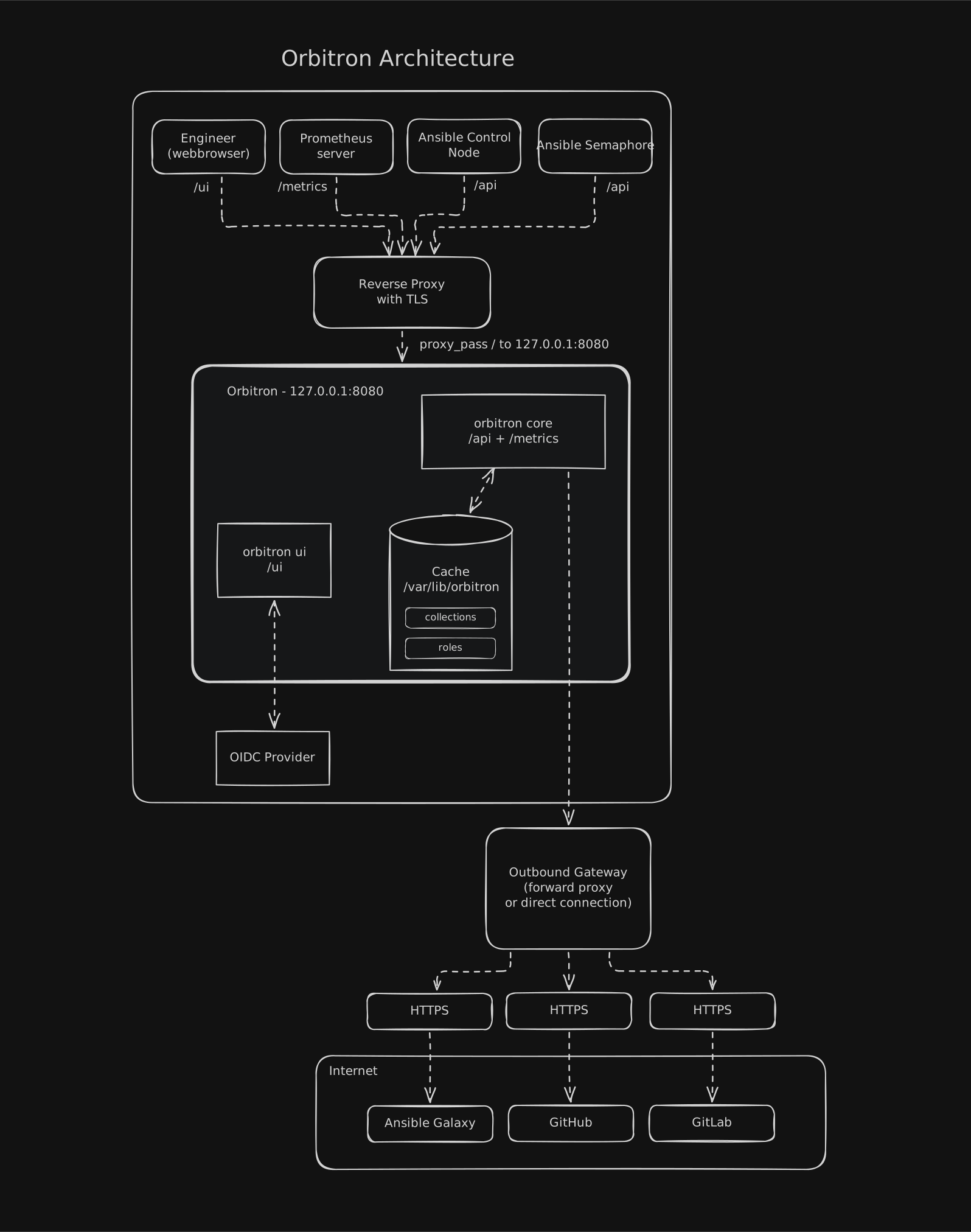
- Management API + Galaxy V1+V3 serving on one port
- Bearer / Basic auth on every admin endpoint
- Concurrent sync workers, SIGHUP config hot-reload
- HTMX dashboard, zero build step
- Optional SSO via OIDC
- Live storage inventory, sync status & cache bytes
- SHA-256 content-addressed, deduplicated
- .access.json tracks every read for pruning & telemetry
- Roles as checkout trees, collections as artifacts
- Galaxy V1/V3 + GitHub/GitLab HTTPS upstreams
- Optional forward proxy for restricted networks
- Private CA bundles for outbound TLS
- 01
Ingest manifests
POST YAML role & collection requirements to the management API. Each manifest is content-addressed by SHA-256 and deduplicated on identical re-submission.
- 02
Sync in parallel
Concurrent workers resolve versions against Galaxy V1/V3 or a git remote, download collection .tar.gz artifacts and shallow-clone sources straight from GitHub/GitLab (--depth 1). Versions already on disk are never re-fetched.
- 03
Store on disk
Roles keep unpacked checkout trees; collections are stored as artifacts — both tracked through an atomic access index (.access.json) for pruning and telemetry.
- 04
Serve like Galaxy
Roles — cached as unpacked git checkouts — stream out as on-the-fly .tar.gz; collections are served from their stored .tar.gz with full V3 metadata. ansible-galaxy sees a normal Galaxy server.
Operations on the bridge of a spaceship
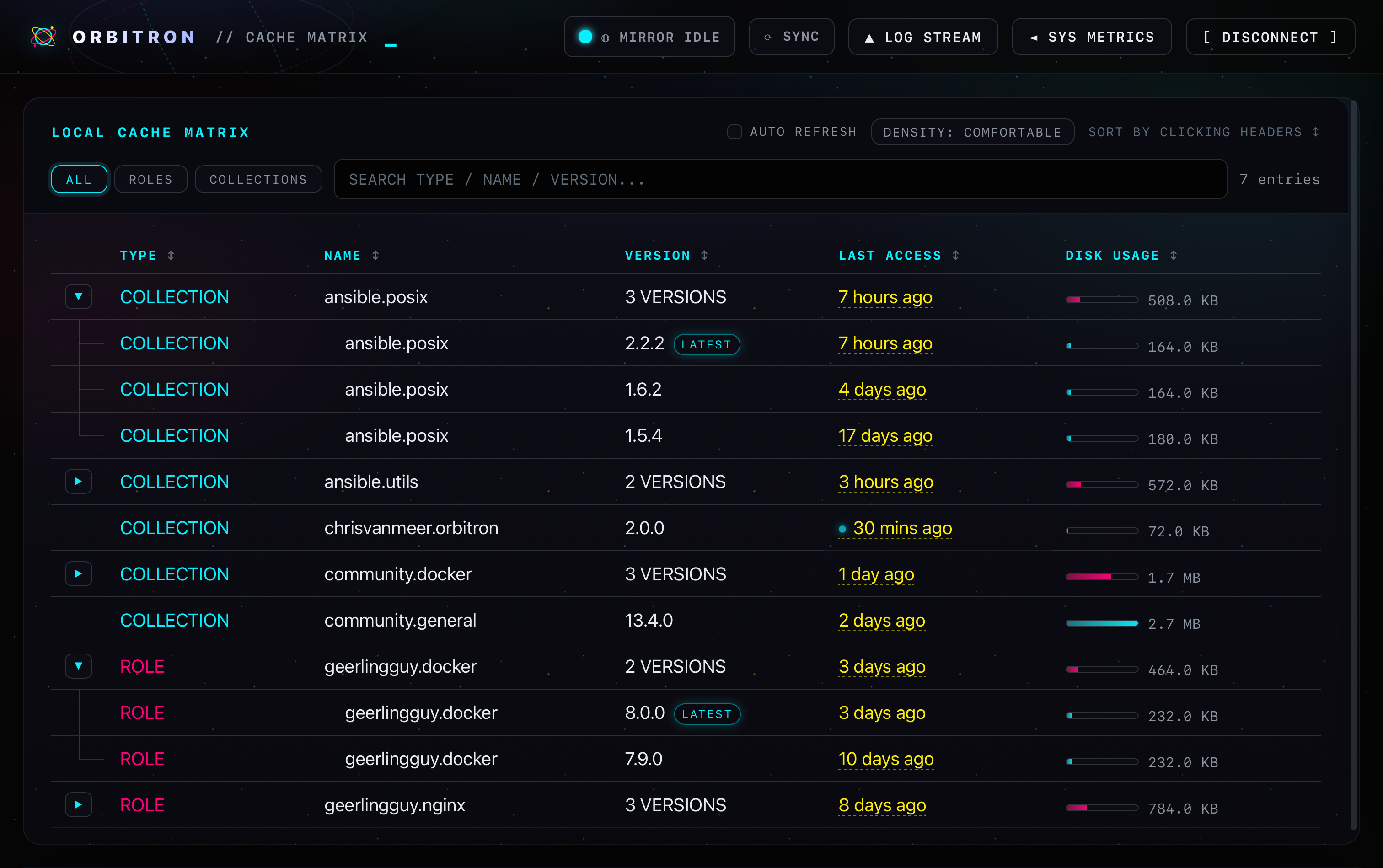
Full-screen, zero-dependency monitoring built into the binary and styled like the Orbitron site itself — a soft galaxy backdrop with drifting orbital rings, from the login screen to the cache matrix.
- 01
Cache Matrix
Every cached role and collection with sortable TYPE / NAME / VERSION / LAST ACCESS / DISK USAGE columns, live search, filters, LATEST pills, fresh-access pulses and collapsed multi-version rows that unfold on click.
- 02
Tail-f log stream
A sliding ▲ LOG STREAM drawer behaves like tail -f — pinned to new lines, releasing when you scroll up, with colorized levels, a text filter, and one-click download to orbitron-logs.txt.
- 03
System telemetry
The ◄ SYS METRICS sidebar reports uplink status, cache activity, cache disk usage, mount free space, OS, architecture and last boot, plus a 14-day access sparkline. Auto-refreshing.
- 04
Air-gap friendly
HTMX is embedded in memory — no external CDN calls. Cookie-based auth, or SSO via Keycloak. Type the mirror’s name for a surprise.
Ship a mirror, not dashboards
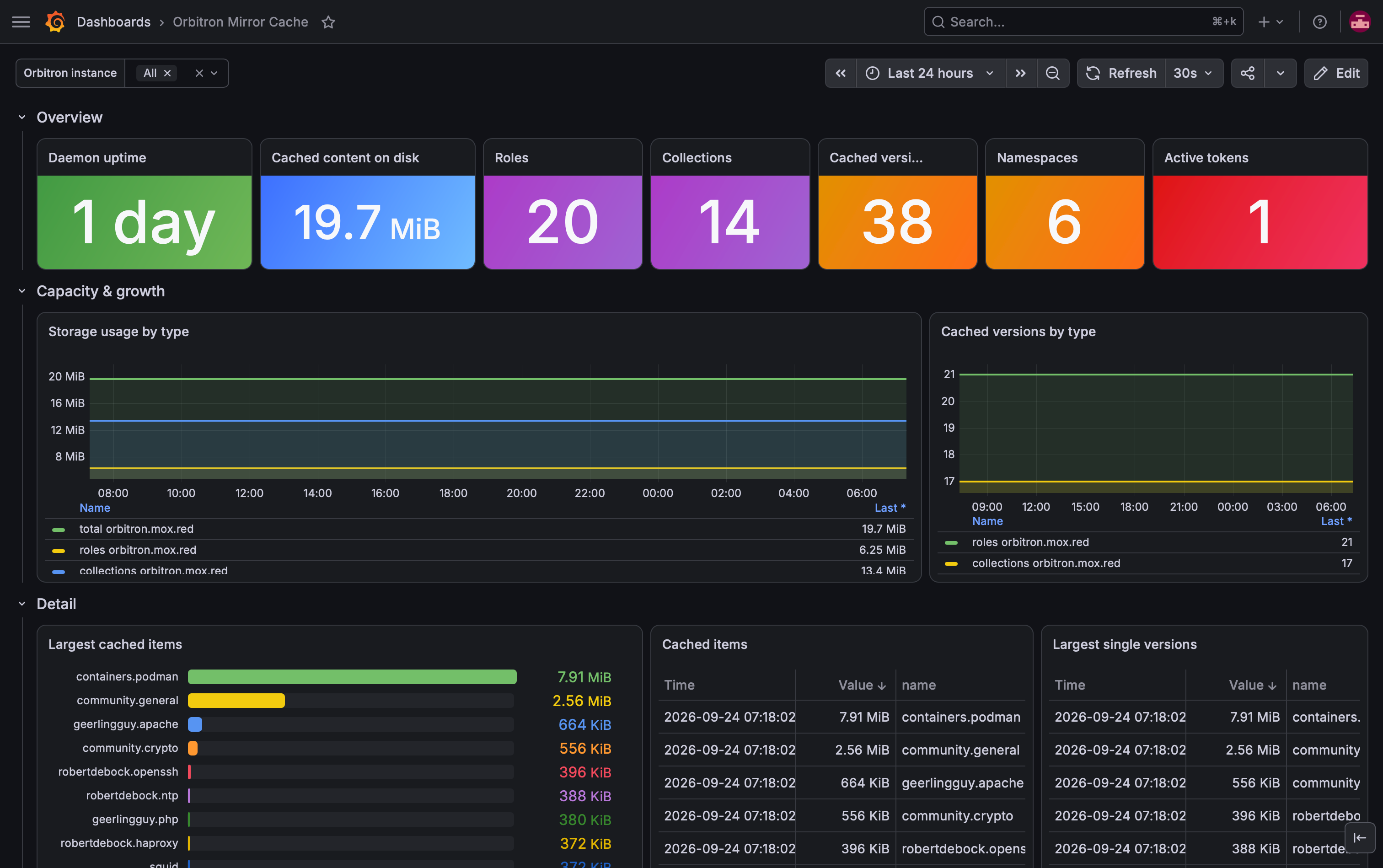
A ready-made Grafana dashboard accompanies the Prometheus endpoint — import it and point it at the scrape targets. Both variants (orbitron_v13_current.json andorbitron_v12_legacy.json) bind to the data source you pick on import.
- 01
Multi-daemon
A single dashboard follows every Orbitron instance behind the same Prometheus via the Orbitron instance template variable.
- 02
Storage & versions
Disk usage, role/collection counts and blocked storage bytes over time — per item and per cached version.
- 03
Overview stats
Uptime, namespaces, tokens and more in stat panels — two visual variants ship in the repo.
- 04
Heavy hitters
A ranked table of the largest cached versions by on-disk footprint — the items that actually drive your capacity plan, at a glance.
Up and mirroring in minutes
Five ways to run a mirror — bare metal, container, Nomad, Kubernetes, or fully managed by Ansible. Same superpower underneath: a Galaxy endpoint your playbooks already know how to talk to.
Install as a systemd service
Fetch a static binary from the releases page, then --install bootstraps the orbitron user, directories, systemd unit and logrotate in one shot. systemctl reload = hot SIGHUP re-config.
$ sudo ./bin/orbitron --install
$ sudo systemctl status orbitron

# create an admin token (script-friendly: -q)
$ sudo orbitron --generate-token -q

# hot-reload config.yml, no downtime
$ sudo systemctl reload orbitron
Run the GHCR image
Multi-arch image (amd64 + arm64), non-root, git and openssh-client bundled. Config is rendered from ORBITRON_* env vars — no file to mount. Persist your cache on a volume. Clone the repo first: the docker-compose.yml in the repo root wires up the image, ports, env and the named cache volume.
$ git clone https://github.com/chrisvanmeer/orbitron.git
$ cd orbitron
$ docker compose up -d
# uses docker-compose.yml from the repo root
[+] Running 1/1
 ✔ Container orbitron  Started

$ docker compose logs orbitron | grep "ADMIN TOKEN"
orbitron  | [2026-09-23 08:12:04] ADMIN TOKEN: obt_xxxx...
# also available via ghcr.io/chrisvanmeer/orbitron:latest
Run the bundled jobspec
orbitron.nomad.hcl ships in the repo root (service + /healthz check, persistent host volume, secrets via env). Clone the repo and run the jobspec from the clone; register a scratch host volume on the Nomad client before the first run.
$ git clone https://github.com/chrisvanmeer/orbitron.git
$ cd orbitron
$ nomad run orbitron.nomad.hcl
$ nomad status orbitron

$ nomad alloc logs <alloc-id> | grep "ADMIN TOKEN"
# host volume: see the "HashiCorp Nomad" README section
Deploy with the bundled Helm chart
A StatefulSet with a persistent volume for the cache and admin token, /healthz probes and an optional ingress. Clone the repo first: helm/orbitron in the repo root is a ready-made chart — configure it straight or via your own values.yaml.
$ git clone https://github.com/chrisvanmeer/orbitron.git
$ cd orbitron
$ helm install orbitron ./helm/orbitron

$ kubectl logs orbitron-0 | grep "ADMIN TOKEN"
orbitron-0  | [2026-09-25 09:12:04] ADMIN TOKEN: obt_xxxx...

# behind a reverse proxy:
$ helm install orbitron ./helm/orbitron \
  --set ingress.enabled=true \
  --set ingress.hosts[0].host=mirror.internal
Declarative, with the official collection
chrisvanmeer.orbitron covers the full lifecycle from Ansible: install, configure, bootstrap tokens, mirror wait-for-sync and day-two pruning — seven HTTP modules plus two roles.Ansible collection docs →
$ ansible-galaxy collection install chrisvanmeer.orbitron
$ ansible-playbook -i hosts orbitron_daemon.yml

# roles:
#   chrisvanmeer.orbitron.orbitron        # install + operate daemon
#   chrisvanmeer.orbitron.orbitron_mirror # declare roles/collections
1 · Feed it
Post a YAML requirements manifest — roles, collections or git-backed sources.
roles:
  - name: geerlingguy.nginx
    version: ">=2.0.0"
  - name: RHEL9-CIS
    src: https://github.com/ansible-lockdown/RHEL9-CIS.git
version: 2.0.2curl -X POST https://orbitron.internal/api/v1/requirements/roles \
-H "Authorization: Bearer $ORBITRON_TOKEN" \
-H "Content-Type: text/yaml" \
--data-binary @roles_requirements.yml2 · Consume it
Point ansible-galaxy at the mirror. That is the whole setup.
[galaxy]
server_list = orbitron

[galaxy_server.orbitron]
url = https://orbitron.internal/api/
# token = YOUR_ORBITRON_TOKEN # if require_auth_pull# install the roles
ansible-galaxy role install -r roles_requirements.yml
# install the collections
ansible-galaxy collection install -r collections_requirements.ymlPut it behind a reverse proxy. Terminate TLS with Nginx,Traefik or HAProxy in front of the daemon — Orbitron honorsX-Forwarded-Proto / X-Forwarded-For, and ansible.cfgabove talks native HTTPS. Point load balancer health checks at the unauthenticatedGET /healthz (200 when storage is writable). This keeps API calls, tokens and any git credentials in mirrored src URLs encrypted in transit.
Reverse proxy one-pagers
Terminate TLS in front of the daemon — same config as the docs, copy-paste ready.
<VirtualHost *:443>
    ServerName orbitron.example.com

    SSLEngine on
    SSLCertificateFile    /etc/letsencrypt/live/orbitron.example.com/fullchain.pem
    SSLCertificateKeyFile /etc/letsencrypt/live/orbitron.example.com/privkey.pem

    ProxyPreserveHost On
    ProxyRequests Off
    ProxyTimeout 300

    ProxyPass        / http://127.0.0.1:8080/ retry=0
    ProxyPassReverse / http://127.0.0.1:8080/

    RequestHeader set X-Forwarded-Proto "https"
    RequestHeader set X-Forwarded-For  "%{REMOTE_ADDR}s"
</VirtualHost>orbitron.example.com {
# Caddy sets X-Forwarded-Proto / X-Forwarded-For automatically
reverse_proxy 127.0.0.1:8080
}frontend orbitron
bind :443 ssl crt /etc/haproxy/certs/orbitron.pem
default_backend orbitron_backend
backend orbitron_backend
option forwardfor
option httpchk GET /healthz
http-request set-header X-Forwarded-Proto https if { ssl_fc }
timeout server 5m
server orbitron 127.0.0.1:8080 check inter 10sserver {
listen 443 ssl;
http2 on;
server_name orbitron.example.com;
ssl_certificate /etc/letsencrypt/live/orbitron.example.com/fullchain.pem;
ssl_certificate_key /etc/letsencrypt/live/orbitron.example.com/privkey.pem;
proxy_read_timeout 300s;
proxy_send_timeout 300s;
location / {
proxy_pass http://127.0.0.1:8080;
proxy_set_header Host $host;
proxy_set_header X-Forwarded-Proto $scheme;
proxy_set_header X-Forwarded-For $proxy_add_x_forwarded_for;
}
location = /healthz {
proxy_pass http://127.0.0.1:8080/healthz;
}
}http:
routers:
orbitron:
rule: "Host(`orbitron.example.com`)"
service: orbitron
tls:
certResolver: letsencrypt
services:
orbitron:
loadBalancer:
servers:
- url: http://127.0.0.1:8080
# Traefik sets X-Forwarded-* automatically
healthCheck:
path: /healthz
interval: 10sManagement endpoints that play nice
A small, pragmatic API surface — ingest content, watch syncs, inspect storage and run day-two operations. The Galaxy V1 & V3 serving endpoints live on the same tree.
Unauthenticated liveness for load balancers & orchestrators — 200 when the storage path is writable, 503 when degraded.
Ingest role & collection YAML manifests. Content-addressed by SHA-256 and deduplicated; parallel workers mirror on the spot.
Re-run every stored manifest, or poll progress and a bounded history of finished syncs.
Full cached-version inventory. DELETE /storage/{type}/{name}/{version} purges a single cached version.
Access-based cleanup with retention window — preview exactly what would be deleted with {"dry_run": true}.
Token lifecycle: create, list, revoke and rotate admin tokens, with optional per-token TTLs.
Stream the whole cache as a .tar.gz backup, with a per-file SHA-256 manifest. The token store is never included.
Prometheus exposition — uptime, cache counts, version totals and block-level storage bytes.
Every endpoint above except /healthz requires a Bearer token or HTTP Basic auth.
Runs where your fleet runs
One binary, every home. Orchestrate it like the rest of your platform, or let the Ansible collection do the orchestrating for you.
- linux/amd64
- linux/arm64
- GPL-3.0
- Go 1.26
- HTMX 4
- PEP 440
self-host · cache · serve
Keep automation moving, even offline
Grab the binary, feed it a requirements file, and let your fleet install roles and collections at LAN speed — pinned, cached and yours forever.